Encoder
Written By Robert Thomas
Last updated 11 months ago
In the Video On Demand section, you can adjust the quality settings for the encoder based on the media input profile of the uploaded clip. Use the drop-down boxes to change the output profile used for the best, high, and low quality versions of streaming clips.
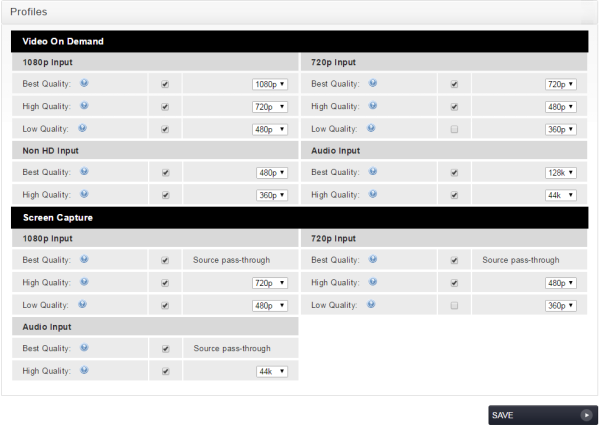
Output video qualities that can be selected are:
1080p
720p
480p
360p
240p
Note: By default, audio files use a 128K profile for the high quality version and a 44K profile for the low quality transcoding.
Tip: You can uncheck the box for a output profile, such as low-quality versions of HD input files, so that this version of the clip is not produced during the encoding process. This saves disk space and encoding time.
Screen Capture Options
The Screen Capture quality options are used for setting the encoding qualities of files that are encoded from the MEDIALecture screen capture application.
Best Quality — When using MEDIALecture, encoding of the screen recording is done on the fly on the client machine running the application. The best quality version is therefore passed through to MEDIAL, meaning that no additional transcoding is necessary. The best quality version of the file is available in MEDIAL immediately after it has been ingested.
Other Qualities — The other qualities are configured in the same way as for video on demand. Use the drop-down boxes to select a different quality for a version of the encoding. Uncheck a check box to specify that a particular output profile is not encoded.
For more information: MEDIALecture is licensed separately from MEDIAL. If you are interested in learning more about MEDIALecture, please contact your regional Sales representative.
Supported Input Formats
The lists below covers the media input formats that can be uploaded to MEDIAL for conversion:
Video
AVI
DiVX (3.11, 5, 6+)
Indeo Codecs
Intel Indeo / iTU
MS MP4
XViD
Techsmith Screen
VP6
X264
MJPEG
MP4
DiVX
XViD
3ViX
H.264
MPEG 4 Part 2
MOV (Apple LossLess audio is not supported for any MOV files.)
H.263
H.264
MPEG 4 Part 2
Sorenson (including Animation)
FLV
VP6
H.264
DV
DV PAL/NTSC
DVCPro PAL/NTSC
MPEG
MPEG 1
MPEG 2
WMV (DRM is not supported for any Windows Media files.)
Windows Media v7+
Windows Media Screen
Windows Media Uncompressed
Windows Media Audio v7+
Audio
WAV
MP3
WMA
Was this helpful?
Still need help? Ask the team