Requirements
Written By Robert Thomas
Last updated 6 months ago
This topic describes the requirements and options for the MEDIAL system components. You can install the system in a basic configuration where all components reside on a single server. Or you can distribute components across multiple machines to create a load-balanced, advanced deployment. This topic also discusses IP address requirements for the MEDIAL server.
Windows Operating System
Windows Server 2022 is recommended for all system servers.
MEDIAL
The MEDIAL software provides the system interface and records the user data. The following table lists the minimum and recommended hardware and software specifications for the MEDIAL application. An load-balanced deployment requires two servers with the minimum requirements shown here.

MEDIAL requires the use of a SQL Server database, which can be either the free Microsoft SQL Server Express (2022 or later version) or a more full-featured version of SQL Server. In a basic configuration, the database resides on the MEDIAL machine. In a load-balanced deployment, multiple MEDIAL instances point to the same database, which, in order to make the system resilient, should be hosted on an MSSQL cluster.
Tip: If you will be using a SQL cluster, install SQL Express on MEDIAL as explained in the topic SQL Server Installation. After you install the full system, you can migrate the local database to the SQL cluster as explained in the topic SQL Cluster.
Note: Include databases in a regular SQL maintenance plan so that they are regularly backed up.

Virtualization Technology Support
VMWare and Microsoft Hyper-V virtualization technologies are supported for MEDIAL.

In a load-balanced deployment of MEDIAL, the content location is shared between the two systems. Storage should be RAID mirrored and it is recommended that it is replicated by DFS. For MEDIAL access, the file system of the content store must be NTFS.
Tip: Regular virus scanning using an Enterprise grade AV solution is recommended.
Transcoder Instances
The MEDIAL transcoders encode the user-uploaded video and audio into streaming formats. The following are the recommended hardware specifications for each MEDIAL transcoding instance. One additional machine (either physical or virtual) is required for each additional encoding instance.

Because media encoding can be processor-intensive, you can install multiple transcoding instances on separate machines to allow for simultaneous transcoding of clips during periods of high demand. You can deploy extra transcoding instances without configuring a fully load-balanced solution. The following figure illustrates a single MEDIAL with multiple transcoding instances moved to separate machines.
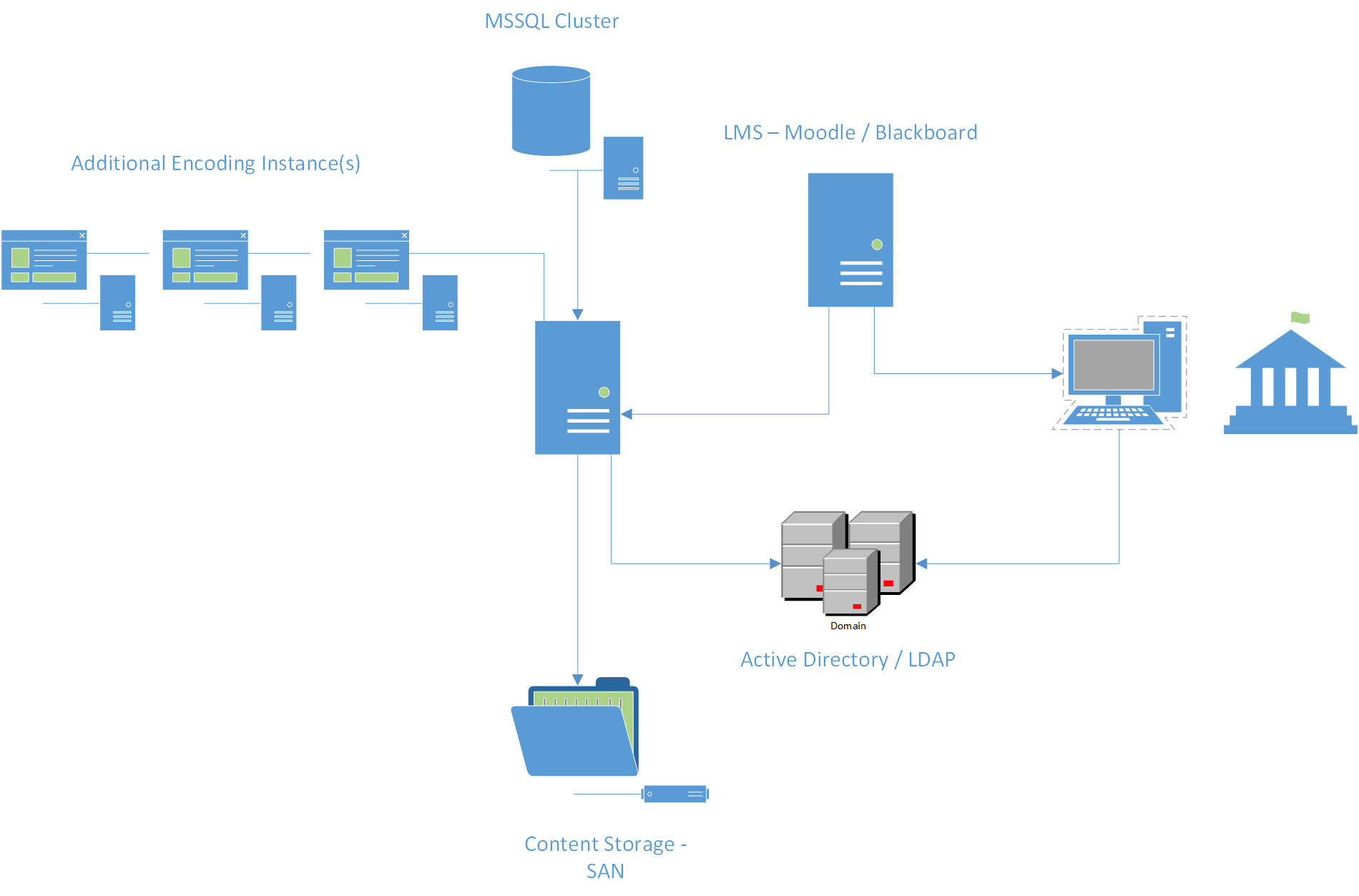
Note: Each transcoding machine added to the load-balanced installation requires an additional MEDIAL Transcoding Instance License along with one year of technical support.

Virtualization Technology Support
VMWare and Microsoft Hyper-V virtualization technologies are supported for encoding instances.
Wowza Media Server
The Wowza Media Server streams media clips and live feeds to users. In a basic setup, it runs on the server that hosts the MEDIAL application. However, you can install Wowza on dedicated hardware to separate the streaming engine from the media library and encoders. The following hardware specifications are recommended for a standalone installation.
Plugins
MEDIAL provides several optional plugins that allow you to integrate third-party features such as Active Directory or the Blackboard learning environment. The section Plugins explains how to set up the following plugins.
The AD/LDAP plugin allows MEDIAL to authenticate users with Active Directory or Lightweight Directory Access Protocol. This allows users to access the MEDIAL interface with their existing network credentials rather than setting up separate accounts in MEDIAL.
MEDIAL can integrate with Moodle, Blackboard, Canvas and Brightspace Learning Management Systems. This allows teachers and students to view and share media directly through the LMS environment.
The SOAP API plugin allows third-party applications to retrieve information about media in the MEDIAL library.
The Session Manager plugin enables the MEDIAL secure categories, which prevent sensitive content from being accessed outside of the media library.
The MEDIALecture add-on allows you to record and edit lecture videos.
IP Addresses
It is recommended to use three IP addresses for the MEDIAL server as summarized in the following table. If the Wowza Media Server is installed on a separate machine, however, the MEDIAL server needs only two IP addresses.
Note: When using Windows Server 2022 SNI can be used in IIS, so the MEDIAL sites can use the same IP address with this configured.
For more information: The section Add Network Addresses explains how to add all of the addresses to the network card.

Two addresses are bound to Internet Information Services (IIS) for the MEDIAL site:
Users visit the front-end address to interact with MEDIAL.
The back-end address is used for media upload and certain administrative functions.
For more information: The section Bind IP Addresses explains how to bind the front-end and back-end addresses to IIS.
Advanced Deployment
MEDIAL systems can scale beyond a basic single-server deployment, providing a highly resilient, load-balanced solution. An advanced deployment uses two or more servers running identical versions of MEDIAL software components The following illustration demonstrates the optimal set-up of a fully featured advanced deployment.
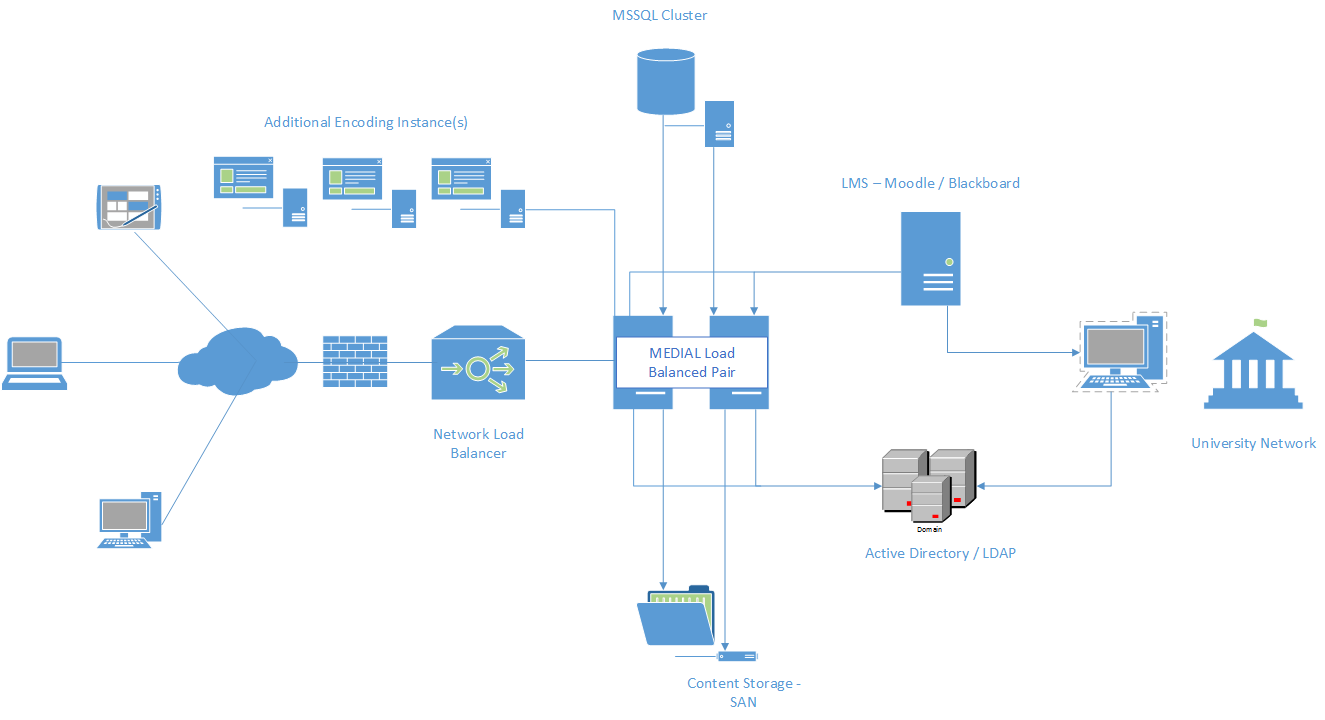
This deployment illustrates the following:
Two load-balanced MEDIAL servers that share an MSSQL database cluster and a content storage network.
Three separate encoding instances accessible to each MEDIAL instance.
Integration with learning management systems (LMS) and Active Directory/LDAP servers.

Major benefits of a distributed MEDIAL ststen include:
Redundancy
In the event of a hardware failure on a single piece of equipment, the MEDIAL application remains available for use on the second machine.
Load Balancing
This setup spreads processing power across two MEDIAL servers to increase performance and provide redundancy.
Note: Optionally Wowza Media Servers can be installed on separate hardware so that the delivery of clips and streams does not interfere with other user activity.
Scalable Encoding
A load-balanced solution uses multiple, separate encoders that the media library can employ simultaneously, shortening the encoding times for uploaded content.

The following are the minimum software requirements for a load-balanced system:
2 x MEDIAL, including 1 Year Upgrade & Support
2 x Wowza Media Server, including 1 Year Upgrade & Support
2 x MEDIAL Active Directory/LDAP Plugin, including 1 Year Upgrade & Support

Professional Services Requirements
Professional services must also be purchased for a minimum of 1 day to assess what will be required to deploy and configure the solution:
1 x Offsite Consultancy – Setup, Configuration – day rate
A typical on-premise deployment would consume approximately 4 days of professional services:
4 x Offsite Consultancy – Setup, Configuration – day rate
Contact your sales representative for details.
Was this helpful?
Still need help? Ask the team